
Smart Excel-Compatible Clipboard
ClipboardPlugin adds rich, Excel-compatible range copy and paste. It negotiates the
best browser-visible representation in this order: the lossless RevoGrid payload,
application handlers, Excel HTML, generic HTML tables, and TSV/plain text.
Use DataGridFormattingPlugin for the recommended setup. It installs one clipboard
owner automatically, so copied values, formulas, formats, merged cells, and explicit
row/column sizes share one canonical clipboard document:
import { DataGridFormattingPlugin } from '@revolist/revogrid-pro';
grid.plugins = [DataGridFormattingPlugin];The clipboard codec only extracts browser-visible Excel declarations. Their
normalization into DataGridCellFormat, storage, rendering, and conversion back to
Excel HTML are owned by DataGridFormattingPlugin; clipboard code never applies
cell CSS directly.
For the complete formatting model, cell/range/row/column scopes, precedence, Format Cells UI, state persistence, and workbook export, see Format Cells.
What is preserved
Section titled “What is preserved”| Capability | RevoGrid → RevoGrid | Excel → RevoGrid | RevoGrid → Excel |
|---|---|---|---|
| Values | Typed values through the rich payload, including serializable objects | Explicit numeric/boolean HTML values stay typed. When Excel supplies display-only Accounting, Percentage, or date text, the formatting plugin uses the accompanying number format to recover a canonical number or Excel serial date | Numbers, booleans, percentages, and dates are emitted as typed Excel HTML values; text remains text |
| Formulas | A1 source, plus the evaluated cached value when FormulaPlugin is available | Browser-visible A1 or R1C1 formulas normalize to FormulaPlugin-compatible A1. If Excel exposes only the displayed result, the formula source cannot be recovered | A1 source becomes Excel-relative R1C1 with a typed cached result when FormulaPlugin is available |
| Number and date formats | Exact canonical preset or custom-code format | mso-number-format becomes a canonical { kind: 'code' } format | Presets and exact codes become Excel number-format declarations |
| Font and fill | Preserved through DataGridCellFormat.appearance | Allowlisted font, emphasis, text color, and fill declarations are converted | Canonical typography and colors become Excel-compatible HTML styles |
| Alignment and text layout | Horizontal/vertical alignment, wrap, indent, rotation, and shrink-to-fit | Supported Excel declarations are normalized into appearance options | Canonical options are serialized back to Excel HTML |
| Borders | Per-edge style, color, and width | Supported shorthand and longhand Excel borders are normalized | Per-edge borders are emitted; legacy uniform border options remain shorthand |
| Multiple ranges | Sparse offsets and gaps are lossless in the rich payload | Multiple browser-visible HTML tables are decoded as ranges | Each range is emitted as an HTML table; rich RevoGrid geometry remains available to RevoGrid |
| Merged cells | Merge spans are carried and applied when every destination is writable | rowspan and colspan become merge metadata | Merge metadata becomes rowspan and colspan |
| Row heights and column widths | Carried in the rich document; destination RevoGrid resizing is not applied currently | Parsed and retained, but destination RevoGrid resizing is not applied currently | Explicit sizes are emitted in the Excel HTML table |
| Application metadata | Namespaced serializable contributors are lossless | Available only when exposed by a registered handler | Written by compatible registered handlers |
Formatting is applied only after the existing provider-backed value paste is accepted. Readonly cells, rejected validation targets, canceled edits, and synthetic grouping rows do not receive formatting or merges.
Excel Desktop does not expose identical browser HTML on every platform. For
example, Excel for macOS may omit x:num and copy $ 1,250.50, 18.0%, or
8/20/26 as display text accompanied by Accounting, Percentage, or Short Date
format declarations. DataGridFormattingPlugin decodes Excel’s CSS escapes and
named formats, converts those known display-only values to canonical numbers or
Excel serial dates, and stores the imported number format as a
DataGridCellFormat. Unknown or ambiguous text is left unchanged.
Display-only Excel category coverage
Section titled “Display-only Excel category coverage”Excel’s browser HTML varies by platform, but the formatting owner covers every documented cell number-format category when a usable format declaration is present:
| Excel category | Display-only value recovery |
|---|---|
| General | Kept as text unless Excel supplies an explicit typed attribute; visual text alone is ambiguous |
| Number | Localized decimals, grouping, negative signs, parentheses, and scaling commas become numbers |
| Currency and Accounting | Locale/currency tokens and aligned currency displays become numbers; the exact format code remains canonical formatting |
| Percentage | The displayed percentage is converted back to its underlying decimal value once per % token |
| Fraction | Simple, mixed, fixed-denominator, and negative fraction displays become numbers |
| Scientific | Localized mantissas and signed E exponents become numbers |
| Date | Numeric and localized month-name dates become Excel serial dates using the format’s token order and locale |
| Time and Date & time | 12/24-hour times, seconds, fractional seconds, and combined date-time displays become serial day values |
| Elapsed time | [h], [m], and [s] duration displays—including values beyond 24 hours—become serial day fractions |
| Text | Kept exactly as text, including leading zeros |
| Special | Postal, phone, social-security, and comparable placeholder formats recover their numeric value while retaining the exact format code |
| Custom | Numeric/date/time/text classification comes from the compiled code; four sections, conditions, colors, literals, spacing, fill, percentages, scaling, fractions, and scientific notation use the same engine as rendering |
Explicit x:num and boolean attributes always take precedence. Excel error
values and malformed, unsupported, or ambiguous display strings stay unchanged
instead of being guessed. These categories follow Microsoft’s
available number formats
and custom number-format rules.
Native Excel interoperability matrix
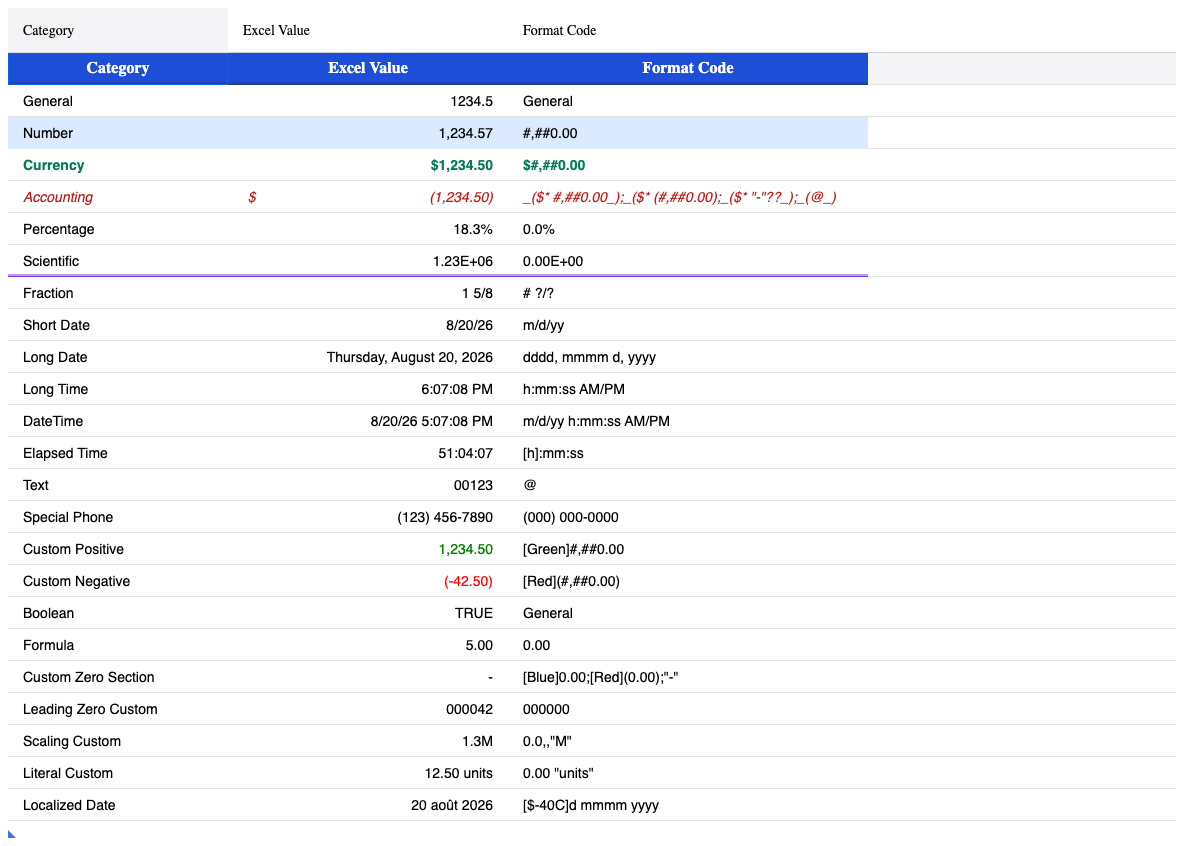
Section titled “Native Excel interoperability matrix”The following matrix was created as a real .xlsx workbook, opened in current
Excel Desktop for macOS, copied through the macOS system clipboard, pasted into
RevoGrid, and then copied from RevoGrid back into Excel. It is not an authored
HTML fixture.
Quick support checklist
Section titled “Quick support checklist”Use this list to compare an Excel range with its RevoGrid result. Native
tested means the format was created in an actual .xlsx workbook and copied
through Excel Desktop for macOS and the system clipboard—not merely passed to
the HTML parser in a test.
| Cell data or number format | Support | Native tested |
|---|---|---|
| General and plain numbers | Supported; an explicit Excel numeric value stays numeric. Ambiguous display-only General text stays text | Yes |
| Number | Supported, including decimals, grouping, signs, parentheses, and scaling commas | Yes |
| Currency and Accounting | Supported, including currency/locale tokens, aligned symbols, negative parentheses, and zero sections | Yes |
| Percentage | Supported; the displayed percentage is restored to its decimal value | Yes |
| Scientific | Supported, including signed exponents | Yes |
| Fraction | Supported, including simple, mixed, fixed-denominator, and negative fractions | Yes |
| Date | Supported for short, long, numeric, month-name, and localized dates | Yes |
| Time, DateTime, and elapsed time | Supported for 12/24-hour time, seconds, fractional seconds, combined values, and [h]/[m]/[s] durations | Yes |
| Text | Supported and emitted with Excel’s Text format so leading zeros and number-like strings remain text | Yes |
| Special | Supported for numeric placeholder formats such as phone and postal masks | Phone mask tested |
| Custom | Supported for up to four sections, conditions, colors, literals, leading zeros, percentages, scaling, fractions, scientific notation, spacing, and fill | Positive/negative/zero sections, leading zeros, scaling, literals, and localized date tested |
| Boolean | Supported when Excel exposes Boolean typing; otherwise the displayed TRUE/FALSE is preserved as text | Conditional on Excel payload |
| Formula | Supported when the clipboard exposes A1/R1C1 source; otherwise only Excel’s displayed/cached result can be preserved | RevoGrid → Excel tested; Excel for macOS omitted formula source |
| Appearance or structure | Support | Native tested |
|---|---|---|
| Font | Family, size, bold, italic, underline, strike-through, and text color | Family, size, bold, italic, and color tested |
| Fill | Solid browser-visible cell background color | Yes |
| Alignment and layout | Horizontal/vertical alignment, wrapping, indentation, text rotation, and shrink-to-fit | Alignment and wrapping tested |
| Borders | Per-edge style, color, and width | Double/per-edge border tested |
| Merged cells | Supported through HTML rowspan/colspan and the rich RevoGrid payload | Automated copy/paste tested |
| Multiple ranges | Lossless between RevoGrid instances; multiple Excel HTML tables are accepted | Automated copy/paste tested |
| Row heights and column widths | Parsed and copied back to Excel HTML; applying imported sizes to the destination RevoGrid is not implemented yet | Metadata emission tested |
| RevoGrid application metadata | Supported through namespaced, serializable contributors in the rich payload | Automated rich-payload tests |
Unsupported or unavailable through browser clipboard
Section titled “Unsupported or unavailable through browser clipboard”| Excel feature | Current behavior |
|---|---|
| Native BIFF/OLE clipboard records | Browsers do not expose them; RevoGrid uses HTML, plain text, and its versioned web custom format |
| Pictures, charts, shapes, and other floating objects | Not part of the cell-range clipboard contract |
| Comments, notes, threaded discussions, and attachments | Not copied |
| Data validation rules, dropdown definitions, and non-serializable validator callbacks | Not copied |
| Conditional-format rules, icon sets, data bars, and workbook themes | Rules are not copied; only browser-visible effective styles may be present in Excel HTML |
| Named ranges, tables, filters, pivot state, external links, and workbook relationships | Not copied |
| Macros, VBA, ActiveX, and embedded objects | Not copied or executed |
| Formula source omitted by Excel | Cannot be reconstructed safely; RevoGrid preserves the displayed/cached result and does not guess |
| Unsupported or malformed display-only values | Preserved as text instead of being coerced |
| Destination RevoGrid row/column resizing | Size metadata is retained, but the destination grid is not resized in the current version |
| Windows Excel native interoperability | Supported through the same browser-visible contract, but not yet manually verified in this matrix |
The pass deliberately records browser limits as limits. Excel for macOS exposed
text/html, text/plain, text/rtf, and Files, but its HTML omitted the raw
formula source and explicit numeric value for some display-only cells. RevoGrid
therefore preserves the displayed formula result in that direction and only
recovers a zero when the accompanying third number-format section identifies
the display literally. RevoGrid does not guess an unavailable formula. Native
Windows Excel remains a separate manual interoperability target because its
browser-visible clipboard payload can differ.
How the representations work together
Section titled “How the representations work together”One copy operation writes several representations because the destination—not the source—chooses which one it understands:
application/x-revogrid-clipboard+jsonversion 2 is the lossless RevoGrid-to-RevoGrid document.- Registered application formats can override built-ins by priority.
text/htmlcarries the richest browser-visible Excel-compatible table.text/plainkeeps the selection useful in editors and applications that do not understand structured clipboard formats.
On paste, RevoGrid negotiates in the same richest-first order. A malformed or
failing handler emits clipboardformaterror and falls through to the next
compatible representation instead of partially applying its result.
Copying from RevoGrid to Excel
Section titled “Copying from RevoGrid to Excel”Copy writes an Excel-compatible HTML table alongside plain text and the lossless
RevoGrid payload. DataGridFormattingPlugin converts its canonical options back to
Excel number-format codes, font, fill, borders, alignment, wrapping, rotation, and
indentation. The clipboard owner also emits formulas with typed cached results,
merged-cell spans, and explicit row and column sizes.
Date and time application values remain unchanged in the grid. For Excel HTML only, the formatting plugin converts valid date-like values to Excel 1900-system serials and writes the matching number-format code. This lets Excel receive a real date cell instead of display text while keeping the application’s source model intact.
ClipboardPlugin can also be installed directly for values and custom formats. It
emits a one-time dependency warning and omits formatting metadata when no formatting
runtime is present.
Browser and Excel boundary
Section titled “Browser and Excel boundary”Browsers expose text/html, text/plain, and permitted web custom formats; they do
not expose Excel’s native BIFF/OLE clipboard records. RevoGrid therefore writes all
compatible browser representations and adds the versioned
application/x-revogrid-clipboard+json format for lossless grid-to-grid transfers.
Pictures, charts, comments, validation callbacks, and other native-only Excel objects
are outside the cell-range contract.
Custom formats
Section titled “Custom formats”Handlers have stable IDs, MIME types, priorities, detection, decoding, and optional
encoding. Higher priorities can override built-ins. A failing handler emits
clipboardformaterror and negotiation continues with the next compatible format.
import type { ClipboardFormatHandler } from '@revolist/revogrid-pro';
const handler: ClipboardFormatHandler = { id: 'acme-cells', mimeTypes: ['application/x-acme-cells+json'], priority: 2_000, canRead: ({ transfer }) => transfer.types.includes('application/x-acme-cells+json'), read: ({ transfer }) => JSON.parse(transfer.getData('application/x-acme-cells+json')), write: ({ document }) => [ { type: 'application/x-acme-cells+json', data: JSON.stringify(document), }, ],};
grid.useClipboard = { formats: [handler], maxCells: 100_000, maxBytes: 10 * 1024 * 1024,};Runtime registration is disposable:
const clipboard = grid .getPlugins() .find((plugin) => plugin instanceof ClipboardPlugin);const unregister = clipboard?.registerFormat(handler);Serializable application metadata can be carried in the rich payload through
registerMetadataContributor. Non-serializable editors, validators, and callbacks
are intentionally never copied.
Migrating from ClipboardJsonPlugin
Section titled “Migrating from ClipboardJsonPlugin”ClipboardJsonPlugin, its legacyJsonText option, and the $rv-parse_ plain-text
marker were removed in v2.8. Use ClipboardPlugin directly, or install
DataGridFormattingPlugin to include formatting support. Object-valued cells are
preserved grid-to-grid through the versioned RevoGrid MIME payload; text/plain
remains readable JSON/text for other applications.
// Beforeimport { ClipboardJsonPlugin } from '@revolist/revogrid-pro';grid.plugins = [ClipboardJsonPlugin];
// After: values and custom clipboard formatsimport { ClipboardPlugin } from '@revolist/revogrid-pro';grid.plugins = [ClipboardPlugin];
// After: recommended when cell formatting is enabledimport { DataGridFormattingPlugin } from '@revolist/revogrid-pro';grid.plugins = [DataGridFormattingPlugin];Applications that persisted or manually generated $rv-parse_ strings must decode
them before upgrading. The smart clipboard intentionally does not interpret marker
text because ordinary user text must remain ordinary text.
Example
Section titled “Example”Source code
import { defineCustomElements } from '@revolist/revogrid/loader';
import { DataGridFormattingPlugin, ColumnStretchPlugin, RowOddPlugin } from '@revolist/revogrid-pro';
import { useRandomData, currentTheme } from '../composables/useRandomData';

const { createRandomData } = useRandomData();
const { isDark } = currentTheme();

defineCustomElements();

type DemoRow = {
  id: number;
  name: string;
  price: number;
  bool: boolean;
  json: Record<string, any>;
  new: Record<string, any> | null;
  notes: string;
};

function formatJson(value: any) {
  if (value == null) {
    return '';
  }
  if (typeof value !== 'object') {
    return String(value);
  }
  return JSON.stringify(value, null, 2);
}

function formatPastedValue(value: any) {
  if (!value) {
    return 'Paste JSON here';
  }
  if (typeof value === 'object') {
    return [value.name, value.emoji].filter(Boolean).join(' ') || 'Object pasted';
  }
  return String(value);
}

function formatClipboardText(value: any) {
  return JSON.stringify(value);
}

function getNextId(rows: DemoRow[]) {
  return rows.reduce((maxId, row) => Math.max(maxId, row.id), 0) + 1;
}

async function writeClipboardText(text: string) {
  try {
    await navigator.clipboard.writeText(text);
    return true;
  } catch (_error) {
    const textarea = document.createElement('textarea');
    textarea.value = text;
    textarea.setAttribute('readonly', 'true');
    textarea.style.position = 'fixed';
    textarea.style.left = '-9999px';
    document.body.appendChild(textarea);
    textarea.select();
    const copied = document.execCommand('copy');
    textarea.remove();
    return copied;
  }
}

function buildSeedRows() {
  return createRandomData(30, { json: true }).map((row: any, index) => ({
    ...row,
    id: index + 1,
    new: null,
    notes: 'Ready',
  })) as DemoRow[];
}

function buildComplexRow(nextId: number): DemoRow {
  return {
    id: nextId,
    name: 'Dragonfruit 🎉',
    price: 32.5,
    bool: true,
    json: {
      name: 'Dragonfruit',
      emoji: '🎉',
      meta: {
        batch: 'interactive',
        labels: ['rich', 'tropical', 'complex'],
        nutrition: {
          sugar: 23,
          vitaminC: true,
        },
      },
    },
    new: null,
    notes: 'Pasted JSON will appear here',
  };
}

const root = document.getElementById('demo-wrapper');
if (root) {
  const container = document.createElement('section');
  container.style.display = 'grid';
  container.style.gridTemplateRows = 'auto auto minmax(0, 1fr)';
  container.style.alignItems = 'start';
  container.style.gap = '10px';
  container.style.padding = '4px 0';
  container.style.fontFamily = 'Arial, sans-serif';
  container.style.boxSizing = 'border-box';
  container.style.width = '100%';
  container.style.height = '100%';
  container.style.minHeight = '0';

  const toolbar = document.createElement('div');
  toolbar.style.display = 'flex';
  toolbar.style.gap = '8px';
  toolbar.style.flexWrap = 'wrap';
  toolbar.style.alignItems = 'center';
  toolbar.style.alignSelf = 'start';

  const statusStrip = document.createElement('div');
  statusStrip.style.display = 'flex';
  statusStrip.style.gap = '8px';
  statusStrip.style.flexWrap = 'wrap';
  statusStrip.style.alignItems = 'center';
  statusStrip.style.alignSelf = 'stretch';

  const summary = document.createElement('p');
  summary.style.margin = '0';
  summary.style.padding = '6px 10px';
  summary.style.border = '1px solid #d8e1ec';
  summary.style.borderRadius = '6px';
  summary.style.background = '#f4f7ff';
  summary.style.fontSize = '12px';
  summary.style.lineHeight = '1.35';
  summary.style.color = '#0f172a';
  summary.style.boxSizing = 'border-box';
  summary.style.flex = '1 1 320px';

  const copyStatus = document.createElement('p');
  copyStatus.style.margin = '0';
  copyStatus.style.padding = '6px 10px';
  copyStatus.style.border = '1px solid #d8e1ec';
  copyStatus.style.borderRadius = '6px';
  copyStatus.style.background = '#f2fbf4';
  copyStatus.style.fontSize = '12px';
  copyStatus.style.lineHeight = '1.35';
  copyStatus.style.color = '#064e3b';
  copyStatus.style.boxSizing = 'border-box';
  copyStatus.style.flex = '1 1 260px';

  const pasteStatus = document.createElement('p');
  pasteStatus.style.margin = '0';
  pasteStatus.style.padding = '6px 10px';
  pasteStatus.style.border = '1px solid #d8e1ec';
  pasteStatus.style.borderRadius = '6px';
  pasteStatus.style.background = '#fff7ed';
  pasteStatus.style.fontSize = '12px';
  pasteStatus.style.lineHeight = '1.35';
  pasteStatus.style.color = '#7c2d12';
  pasteStatus.style.boxSizing = 'border-box';
  pasteStatus.style.flex = '1 1 220px';

  const createButton = (label: string, onClick: () => void) => {
    const button = document.createElement('button');
    button.type = 'button';
    button.textContent = label;
    button.style.padding = '6px 12px';
    button.style.border = '1px solid #cbd5e1';
    button.style.borderRadius = '6px';
    button.style.background = '#fff';
    button.style.cursor = 'pointer';
    button.style.fontSize = '12px';
    button.style.fontFamily = 'inherit';
    button.style.lineHeight = '18px';
    button.style.height = '32px';
    button.style.minHeight = '0';
    button.style.alignSelf = 'center';
    button.style.flex = '0 0 auto';
    button.addEventListener('click', onClick);
    return button;
  };

  const grid = document.createElement('revo-grid');
  grid.style.minHeight = '0';
  grid.style.height = '100%';
  grid.style.alignSelf = 'stretch';
  grid.plugins = [DataGridFormattingPlugin, ColumnStretchPlugin, RowOddPlugin];
  grid.stretch = 'all';
  grid.theme = isDark() ? 'darkMaterial' : 'material';
  grid.hideAttribution = true;

  let sourceRows = buildSeedRows();

  const refreshGridSource = (nextRows: DemoRow[]) => {
    sourceRows = nextRows;
    grid.source = sourceRows;
    summary.textContent = `Rows: ${sourceRows.length} | Try copying JSON cells and pasting back into the 'Paste JSON here' column.`;
  };

  const syncCopyStatus = (message: string) => {
    copyStatus.textContent = `Copy: ${message}`;
  };

  const syncPasteStatus = (message: string) => {
    pasteStatus.textContent = `Paste: ${message}`;
  };

  const summarizeMatrix = (matrix: any[][]) => {
    if (!Array.isArray(matrix) || matrix.length === 0) {
      return 'No clipboard cells.';
    }
    return `${matrix.length} rows × ${matrix[0]?.length ?? 0} columns`;
  };

  const copyRowJson = async (value: any, rowId: number) => {
    const copied = await writeClipboardText(formatClipboardText(value));
    if (copied) {
      syncCopyStatus(`Copied row ${rowId} as JSON text. Use grid-cell copy for lossless object paste.`);
    } else {
      syncCopyStatus('Could not write to clipboard. Use keyboard copy in supported browsers.');
    }
  };

  const columns = [
    {
      name: 'ID',
      prop: 'id',
      size: 80,
    },
    {
      name: 'Source JSON (copy-ready)',
      prop: 'json',
      size: 360,
      cellParser: (model: any, column: any) => JSON.stringify(model[column.prop]),
      cellTemplate: (h: any, { value: jsonValue }: any) => {
        return h('pre', { class: 'bg-gray-200 border border-slate-300 rounded p-1 py-1 text-xs text-center inline-block' }, [
          h('code', { class: 'text-gray-900' }, formatJson(jsonValue)),
        ]);
      },
    },
    {
      name: 'Paste JSON here',
      prop: 'new',
      cellTemplate: (h: any, { value }: any) => {
        return h(
          'pre',
          { class: 'bg-slate-100 border border-slate-300 rounded p-1 py-1 mt-2 text-xs inline-block text-center' },
          [h('code', { class: 'text-slate-900' }, formatPastedValue(value))],
        );
      },
    },
    {
      name: 'State',
      prop: 'notes',
      size: 240,
    },
  ];

  grid.columns = columns;

  grid.addEventListener('beforecopyapply', (event: any) => {
    syncCopyStatus(summarizeMatrix(event.detail?.data));
  });

  grid.addEventListener('beforepasteapply', (event: any) => {
    syncPasteStatus(`Pasted ${summarizeMatrix(event.detail?.parsed)}.`);
  });

  toolbar.append(
    createButton('Refresh source', () => refreshGridSource(buildSeedRows())),
    createButton('Add complex row', () =>
      refreshGridSource([
        buildComplexRow(getNextId(sourceRows)),
        ...sourceRows,
      ]),
    ),
    createButton('Copy first JSON text', () => {
      const firstRow = sourceRows[0];
      if (firstRow) {
        void copyRowJson(firstRow.json, firstRow.id);
      }
    }),
    createButton('Clear pasted values', () =>
      refreshGridSource(
        sourceRows.map((row) => ({
          ...row,
          new: null,
          notes: 'Paste cell emptied',
        })),
      ),
    ),
  );

  statusStrip.append(summary, copyStatus, pasteStatus);
  container.append(toolbar, statusStrip, grid);
  root.appendChild(container);

  refreshGridSource(sourceRows);
  syncCopyStatus('Copy a JSON cell with Ctrl/Cmd+C for lossless grid paste, or copy JSON text for external apps.');
  syncPasteStatus('Paste into the target column to restore objects.');
}
<script setup lang="ts">
import { computed, ref } from 'vue';
import { VGrid } from '@revolist/vue3-datagrid';
import { DataGridFormattingPlugin, ColumnStretchPlugin, RowOddPlugin } from '@revolist/revogrid-pro';
import { useRandomData, currentThemeVue } from '../composables/useRandomData';

const { createRandomData } = useRandomData();
const { isDark } = currentThemeVue();

type DemoRow = {
  id: number;
  name: string;
  price: number;
  bool: boolean;
  json: Record<string, any>;
  new: Record<string, any> | null;
  notes: string;
};

const theme = computed(() => isDark.value ? 'darkMaterial' : 'material');
const copyStatus = ref('Copy: Use Ctrl/Cmd+C on JSON cells to inspect copy payload size.');
const pasteStatus = ref('Paste: Paste into "Paste JSON here" cells to see parsed objects.');
const formatJson = (value: any) => {
  if (value == null) {
    return '';
  }
  if (typeof value !== 'object') {
    return String(value);
  }
  return JSON.stringify(value, null, 2);
};

const formatPastedValue = (value: any) => {
  if (!value) {
    return 'Paste JSON here';
  }
  if (typeof value === 'object') {
    return [value.name, value.emoji].filter(Boolean).join(' ') || 'Object pasted';
  }
  return String(value);
};

const formatClipboardText = (value: any) => JSON.stringify(value);

const writeClipboardText = async (text: string) => {
  try {
    await navigator.clipboard.writeText(text);
    return true;
  } catch (_error) {
    const textarea = document.createElement('textarea');
    textarea.value = text;
    textarea.setAttribute('readonly', 'true');
    textarea.style.position = 'fixed';
    textarea.style.left = '-9999px';
    document.body.appendChild(textarea);
    textarea.select();
    const copied = document.execCommand('copy');
    textarea.remove();
    return copied;
  }
};

const seedRows = () => {
  return createRandomData(30, { json: true }).map((row: any, index: number) => ({
    ...row,
    id: index + 1,
    new: null,
    notes: 'Ready',
  })) as DemoRow[];
};

const buildComplexRow = (nextId: number): DemoRow => ({
  id: nextId,
  name: 'Dragonfruit 🎉',
  price: 32.5,
  bool: true,
  json: {
    name: 'Dragonfruit',
    emoji: '🎉',
    meta: {
      batch: 'interactive',
      labels: ['rich', 'tropical', 'complex'],
      nutrition: {
        sugar: 23,
        vitaminC: true,
      },
    },
  },
  new: null,
  notes: 'Pasted JSON will appear here',
});

const rows = ref<DemoRow[]>(seedRows());

const summarizeMatrix = (matrix: any[][]) => {
  if (!Array.isArray(matrix) || matrix.length === 0) {
    return 'No clipboard cells.';
  }
  return `${matrix.length} rows × ${matrix[0]?.length ?? 0} columns`;
};

const copyToClipboard = async (value: any, rowId: number) => {
  const copied = await writeClipboardText(formatClipboardText(value));
  if (copied) {
    copyStatus.value = `Copied row ${rowId} as JSON text. Use grid-cell copy for lossless object paste.`;
  } else {
    copyStatus.value = 'Could not write to clipboard in this environment.';
  }
};

const copyJsonColumn = {
  name: 'Source JSON (copy-ready)',
  prop: 'json',
  size: 360,
  cellParser: (model: any, column: any) => JSON.stringify(model[column.prop]),
  cellTemplate: (h: any, { value: jsonValue }: any) => {
    return h('pre', { class: 'bg-gray-200 border border-slate-300 rounded p-1 py-1 mt-2 text-xs inline-block text-center' }, [
      h('code', { class: 'text-gray-900' }, formatJson(jsonValue)),
    ]);
  },
};

const columns = [
  {
    name: 'ID',
    prop: 'id',
    size: 80,
  },
  copyJsonColumn,
  {
    name: 'Paste JSON here',
    prop: 'new',
    cellTemplate: (h: any, { value }: any) =>
      h('pre', { class: 'bg-slate-100 border border-slate-300 rounded p-1 py-1 mt-2 text-xs inline-block text-center' }, [
        h('code', { class: 'text-slate-900' }, formatPastedValue(value)),
      ]),
  },
  {
    name: 'State',
    prop: 'notes',
    size: 240,
  },
];

const onCopy = (event: CustomEvent<any>) => {
  copyStatus.value = `Copy: ${summarizeMatrix(event.detail?.data)}`;
};

const onPaste = (event: CustomEvent<any>) => {
  pasteStatus.value = `Paste: ${summarizeMatrix(event.detail?.parsed)}.`;
};

const refreshData = () => {
  rows.value = seedRows();
};

const addComplexRow = () => {
  const nextId = rows.value.reduce((maxId, row) => Math.max(maxId, row.id), 0) + 1;
  rows.value = [buildComplexRow(nextId), ...rows.value];
};

const copyFirstJson = () => {
  const firstRow = rows.value[0];
  if (firstRow) {
    void copyToClipboard(firstRow.json, firstRow.id);
  }
};

const clearPasted = () => {
  rows.value = rows.value.map((row) => ({
    ...row,
    new: null,
    notes: 'Paste cell emptied',
  }));
};

const infoStyle = 'margin: 0; padding: 6px 10px; border: 1px solid #d8e1ec; border-radius: 6px; background: #f4f7ff; font-size: 12px; line-height: 1.35; color: #0f172a; box-sizing: border-box;';
const plugins = [DataGridFormattingPlugin, ColumnStretchPlugin, RowOddPlugin];
const buttonStyle =
  'padding: 6px 12px; border: 1px solid #cbd5e1; border-radius: 6px; background: #fff; cursor: pointer; font-size: 12px; line-height: 18px; height: 32px; min-height: 0; align-self: center; flex: 0 0 auto; font-family: inherit;';
</script>

<template>
  <section style="display: grid; grid-template-rows: auto auto minmax(0, 1fr); align-items: start; gap: 10px; padding: 4px 0; box-sizing: border-box; width: 100%; height: 100%; min-height: 0;">
    <div style="display: flex; gap: 8px; flex-wrap: wrap; align-items: center; align-self: start;">
      <button type="button" :style="buttonStyle" @click="refreshData">Refresh source</button>
      <button type="button" :style="buttonStyle" @click="addComplexRow">Add complex row</button>
      <button type="button" :style="buttonStyle" @click="copyFirstJson">Copy first JSON text</button>
      <button type="button" :style="buttonStyle" @click="clearPasted">Clear pasted values</button>
    </div>
    <div style="display: flex; gap: 8px; flex-wrap: wrap; align-items: center; align-self: stretch;">
      <p :style="`${infoStyle} flex: 1 1 320px;`">Rows: {{ rows.length }} | Try copying JSON cells and pasting back into the "Paste JSON here" column.</p>
      <p :style="`${infoStyle} background: #f2fbf4; color: #064e3b; flex: 1 1 260px;`">{{ copyStatus }}</p>
      <p :style="`${infoStyle} background: #fff7ed; color: #7c2d12; flex: 1 1 220px;`">{{ pasteStatus }}</p>
    </div>
    <VGrid
      :theme="theme"
      :source="rows"
      :columns="columns"
      :plugins="plugins"
      stretch="all"
      :hideAttribution="true"
      @beforecopyapply="onCopy"
      @beforepasteapply="onPaste"
      style="height: 100%; align-self: stretch;"
    />
  </section>
</template>
import React, { useCallback, useMemo, useState } from 'react';
import { RevoGrid } from '@revolist/react-datagrid';
import { DataGridFormattingPlugin, ColumnStretchPlugin, RowOddPlugin } from '@revolist/revogrid-pro';
import { useRandomData, currentTheme } from '../composables/useRandomData';

const ClipboardJsonDemo: React.FC = () => {
  const { createRandomData } = useRandomData();
  const theme = currentTheme().isDark() ? 'darkMaterial' : 'material';
  const [copyStatus, setCopyStatus] = useState('Copy: Use Ctrl/Cmd+C on JSON cells to inspect copy payload size.');
  const [pasteStatus, setPasteStatus] = useState('Paste: Paste into "Paste JSON here" cells to see parsed objects.');
  type DemoRow = {
    id: number;
    name: string;
    price: number;
    bool: boolean;
    json: Record<string, any>;
    new: Record<string, any> | null;
    notes: string;
  };

  const formatJson = useCallback((value: any) => {
    if (value == null) {
      return '';
    }
    if (typeof value !== 'object') {
      return String(value);
    }
    return JSON.stringify(value, null, 2);
  }, []);

  const formatPastedValue = useCallback((value: any) => {
    if (!value) {
      return 'Paste JSON here';
    }
    if (typeof value === 'object') {
      return [value.name, value.emoji].filter(Boolean).join(' ') || 'Object pasted';
    }
    return String(value);
  }, []);

  const formatClipboardText = useCallback((value: any) => JSON.stringify(value), []);

  const writeClipboardText = useCallback(async (text: string) => {
    try {
      await navigator.clipboard.writeText(text);
      return true;
    } catch (_error) {
      const textarea = document.createElement('textarea');
      textarea.value = text;
      textarea.setAttribute('readonly', 'true');
      textarea.style.position = 'fixed';
      textarea.style.left = '-9999px';
      document.body.appendChild(textarea);
      textarea.select();
      const copied = document.execCommand('copy');
      textarea.remove();
      return copied;
    }
  }, []);

  const seedRows = useCallback(() => {
    return createRandomData(30, { json: true }).map((row: any, index: number) => ({
      ...row,
      id: index + 1,
      new: null,
      notes: 'Ready',
    })) as DemoRow[];
  }, [createRandomData]);

  const buildComplexRow = useCallback((nextId: number): DemoRow => ({
    id: nextId,
    name: 'Dragonfruit 🎉',
    price: 32.5,
    bool: true,
    json: {
      name: 'Dragonfruit',
      emoji: '🎉',
      meta: {
        batch: 'interactive',
        labels: ['rich', 'tropical', 'complex'],
        nutrition: {
          sugar: 23,
          vitaminC: true,
        },
      },
    },
    new: null,
    notes: 'Pasted JSON will appear here',
  }), []);

  const [source, setSource] = useState<DemoRow[]>(() => seedRows());
  const plugins = useMemo(() => [DataGridFormattingPlugin, ColumnStretchPlugin, RowOddPlugin], []);

  const copyToClipboard = useCallback(async (value: any, rowId: number) => {
    const copied = await writeClipboardText(formatClipboardText(value));
    if (copied) {
      setCopyStatus(`Copied row ${rowId} as JSON text. Use grid-cell copy for lossless object paste.`);
    } else {
      setCopyStatus('Could not write to clipboard in this environment.');
    }
  }, [formatClipboardText, writeClipboardText]);

  const summarizeMatrix = useCallback((matrix: any[][]) => {
    if (!Array.isArray(matrix) || matrix.length === 0) {
      return 'No clipboard cells.';
    }
    return `${matrix.length} rows × ${matrix[0]?.length ?? 0} columns`;
  }, []);

  const handleCopy = useCallback((event: any) => {
    setCopyStatus(`Copy: ${summarizeMatrix(event.detail?.data)}`);
  }, [summarizeMatrix]);

  const handlePaste = useCallback((event: any) => {
    setPasteStatus(`Paste: ${summarizeMatrix(event.detail?.parsed)}.`);
  }, [summarizeMatrix]);

  const columns = useMemo(() => [
    {
      name: 'ID',
      prop: 'id',
      size: 80,
    },
    {
      name: 'Source JSON (copy-ready)',
      prop: 'json',
      size: 360,
      cellParser: (model: any, column: any) => JSON.stringify(model[column.prop]),
      cellTemplate: (h: any, { value: jsonValue }: any) => {
        return h(
          'pre',
          { style: { margin: 0 } },
          [h('code', { className: 'text-xs' }, formatJson(jsonValue))],
        );
      },
    },
    {
      name: 'Paste JSON here',
      prop: 'new',
      cellTemplate: (h: any, { value }: any) => {
        return h(
          'pre',
          { style: { margin: 0 } },
          [h('code', { className: 'text-xs' }, formatPastedValue(value))],
        );
      },
    },
    {
      name: 'State',
      prop: 'notes',
      size: 240,
    },
  ], [formatJson, formatPastedValue]);

  const refreshData = useCallback(() => {
    setSource(seedRows());
  }, [seedRows]);

  const addComplexRow = useCallback(() => {
    setSource((current) => {
      const nextId = current.reduce((maxId, row) => Math.max(maxId, row.id), 0) + 1;
      return [buildComplexRow(nextId), ...current];
    });
  }, [buildComplexRow]);

  const copyFirstJson = useCallback(() => {
    const firstRow = source[0];
    if (firstRow) {
      void copyToClipboard(firstRow.json, firstRow.id);
    }
  }, [copyToClipboard, source]);

  const clearPasted = useCallback(() => {
    setSource((current) =>
      current.map((row) => ({
        ...row,
        new: null,
        notes: 'Paste cell emptied',
      })),
    );
  }, []);

  const buttonStyles = {
    padding: '6px 12px',
    border: '1px solid #cbd5e1',
    borderRadius: '6px',
    background: '#fff',
    cursor: 'pointer',
    fontSize: '12px',
    lineHeight: '18px',
    height: '32px',
    minHeight: 0,
    alignSelf: 'center',
    flex: '0 0 auto',
  } as React.CSSProperties;

  const infoStyle: React.CSSProperties = {
    margin: 0,
    padding: '6px 10px',
    border: '1px solid #d8e1ec',
    borderRadius: '6px',
    background: '#f4f7ff',
    fontSize: '12px',
    lineHeight: 1.35,
    color: '#0f172a',
    boxSizing: 'border-box',
  };

  return (
    <div style={{
      display: 'grid',
      gridTemplateRows: 'auto auto minmax(0, 1fr)',
      alignItems: 'start',
      gap: '10px',
      padding: '4px 0',
      boxSizing: 'border-box',
      width: '100%',
      height: '100%',
      minHeight: 0,
    }}>
      <div style={{ display: 'flex', gap: '8px', flexWrap: 'wrap', alignItems: 'center', alignSelf: 'start' }}>
        <button style={buttonStyles} type="button" onClick={refreshData}>Refresh source</button>
        <button style={buttonStyles} type="button" onClick={addComplexRow}>Add complex row</button>
        <button style={buttonStyles} type="button" onClick={copyFirstJson}>Copy first JSON text</button>
        <button style={buttonStyles} type="button" onClick={clearPasted}>Clear pasted values</button>
      </div>
      <div style={{ display: 'flex', gap: '8px', flexWrap: 'wrap', alignItems: 'center', alignSelf: 'stretch' }}>
        <p style={{ ...infoStyle, flex: '1 1 320px' }}>Rows: {source.length} | Try copying JSON cells and pasting back into the "Paste JSON here" column.</p>
        <p style={{ ...infoStyle, background: '#f2fbf4', color: '#064e3b', flex: '1 1 260px' }}>{copyStatus}</p>
        <p style={{ ...infoStyle, background: '#fff7ed', color: '#7c2d12', flex: '1 1 220px' }}>{pasteStatus}</p>
      </div>
      <RevoGrid
        theme={theme}
        source={source}
        columns={columns}
        plugins={plugins}
        stretch="all"
        hideAttribution
        onBeforecopyapply={handleCopy}
        onBeforepasteapply={handlePaste}
        style={{ minHeight: 0, height: '100%', alignSelf: 'stretch' }}
      />
    </div>
  );
};

export default ClipboardJsonDemo;
import { Component } from '@angular/core';
import { RevoGrid } from '@revolist/angular-datagrid';
import { DataGridFormattingPlugin, ColumnStretchPlugin, RowOddPlugin } from '@revolist/revogrid-pro';
import { useRandomData, currentTheme } from '../composables/useRandomData';

type DemoRow = {
  id: number;
  name: string;
  price: number;
  bool: boolean;
  json: Record<string, any>;
  new: Record<string, any> | null;
  notes: string;
};

@Component({
  selector: 'clipboard-json-grid',
  standalone: true,
  imports: [RevoGrid],
  template: `
    <section style="display: grid; grid-template-rows: auto auto minmax(0, 1fr); align-items: start; gap: 10px; padding: 4px 0; box-sizing: border-box; width: 100%; height: 100%; min-height: 0;">
      <div style="display: flex; gap: 8px; flex-wrap: wrap; align-items: center; align-self: start;">
        <button type="button" (click)="refreshData()" style="padding: 6px 12px; border: 1px solid #cbd5e1; border-radius: 6px; background: #fff; cursor: pointer; font-size: 12px; line-height: 18px; height: 32px; min-height: 0; align-self: center; flex: 0 0 auto; font-family: inherit;">Refresh source</button>
        <button type="button" (click)="addComplexRow()" style="padding: 6px 12px; border: 1px solid #cbd5e1; border-radius: 6px; background: #fff; cursor: pointer; font-size: 12px; line-height: 18px; height: 32px; min-height: 0; align-self: center; flex: 0 0 auto; font-family: inherit;">Add complex row</button>
        <button type="button" (click)="copyFirstJson()" style="padding: 6px 12px; border: 1px solid #cbd5e1; border-radius: 6px; background: #fff; cursor: pointer; font-size: 12px; line-height: 18px; height: 32px; min-height: 0; align-self: center; flex: 0 0 auto; font-family: inherit;">Copy first JSON text</button>
        <button type="button" (click)="clearPasted()" style="padding: 6px 12px; border: 1px solid #cbd5e1; border-radius: 6px; background: #fff; cursor: pointer; font-size: 12px; line-height: 18px; height: 32px; min-height: 0; align-self: center; flex: 0 0 auto; font-family: inherit;">Clear pasted values</button>
      </div>
      <div style="display: flex; gap: 8px; flex-wrap: wrap; align-items: center; align-self: stretch;">
        <p style="margin: 0; padding: 6px 10px; border: 1px solid #d8e1ec; border-radius: 6px; background: #f4f7ff; font-size: 12px; line-height: 1.35; color: #0f172a; box-sizing: border-box; flex: 1 1 320px;">Rows: {{ source.length }} | Try copying JSON cells and pasting back into the 'Paste JSON here' column.</p>
        <p style="margin: 0; padding: 6px 10px; border: 1px solid #d8e1ec; border-radius: 6px; background: #f2fbf4; font-size: 12px; line-height: 1.35; color: #064e3b; box-sizing: border-box; flex: 1 1 260px;">{{ copyStatus }}</p>
        <p style="margin: 0; padding: 6px 10px; border: 1px solid #d8e1ec; border-radius: 6px; background: #fff7ed; font-size: 12px; line-height: 1.35; color: #7c2d12; box-sizing: border-box; flex: 1 1 220px;">{{ pasteStatus }}</p>
      </div>
      <revo-grid
        [theme]="theme"
        [source]="source"
        [columns]="columns"
        [plugins]="plugins"
        stretch="all"
        [hideAttribution]="true"
        (beforecopyapply)="onCopy($event)"
        (beforepasteapply)="onPaste($event)"
        style="min-height: 0; height: 100%; align-self: stretch;"
      ></revo-grid>
    </section>
  `,
})
export class ClipboardJsonGridComponent {
  theme = currentTheme().isDark() ? 'darkMaterial' : 'material';
  copyStatus = 'Copy: Use Ctrl/Cmd+C on JSON cells to inspect copy payload size.';
  pasteStatus = 'Paste: Paste into "Paste JSON here" cells to see parsed objects.';
  source: DemoRow[] = this.createSeedRows();
  plugins = [DataGridFormattingPlugin, ColumnStretchPlugin, RowOddPlugin];

  columns = [
    {
      name: 'ID',
      prop: 'id',
      size: 80,
    },
    {
      name: 'Source JSON (copy-ready)',
      prop: 'json',
      size: 360,
      cellParser: (model: any, column: any) => JSON.stringify(model[column.prop]),
      cellTemplate: (h: any, { value: jsonValue }: any) => {
        return h('pre', { class: 'bg-gray-200 border border-slate-300 rounded p-1 py-1 mt-2 text-xs inline-block text-center' }, [
          h('code', { class: 'text-gray-900' }, this.formatJson(jsonValue)),
        ]);
      },
    },
    {
      name: 'Paste JSON here',
      prop: 'new',
      cellTemplate: (h: any, data: any) => {
        return h('pre', { class: 'bg-slate-100 border border-slate-300 rounded p-1 py-1 mt-2 text-xs inline-block text-center' }, [
          h('code', { class: 'text-slate-900' }, this.formatPastedValue(data.value)),
        ]);
      },
    },
    {
      name: 'State',
      prop: 'notes',
      size: 240,
    },
  ];

  private createSeedRows() {
    return useRandomData().createRandomData(30, { json: true }).map((row: any, index: number) => ({
      ...row,
      id: index + 1,
      new: null,
      notes: 'Ready',
    })) as DemoRow[];
  }

  private createComplexRow(nextId: number): DemoRow {
    return {
      id: nextId,
      name: 'Dragonfruit 🎉',
      price: 32.5,
      bool: true,
      json: {
        name: 'Dragonfruit',
        emoji: '🎉',
        meta: {
          batch: 'interactive',
          labels: ['rich', 'tropical', 'complex'],
          nutrition: {
            sugar: 23,
            vitaminC: true,
          },
        },
      },
      new: null,
      notes: 'Pasted JSON will appear here',
    };
  }

  private formatJson(value: any) {
    if (value == null) {
      return '';
    }
    if (typeof value !== 'object') {
      return String(value);
    }
    return JSON.stringify(value, null, 2);
  }

  private formatPastedValue(value: any) {
    if (!value) {
      return 'Paste JSON here';
    }
    if (typeof value === 'object') {
      return [value.name, value.emoji].filter(Boolean).join(' ') || 'Object pasted';
    }
    return String(value);
  }

  private formatClipboardText(value: any) {
    return JSON.stringify(value);
  }

  private async writeClipboardText(text: string) {
    try {
      await navigator.clipboard.writeText(text);
      return true;
    } catch (_error) {
      const textarea = document.createElement('textarea');
      textarea.value = text;
      textarea.setAttribute('readonly', 'true');
      textarea.style.position = 'fixed';
      textarea.style.left = '-9999px';
      document.body.appendChild(textarea);
      textarea.select();
      const copied = document.execCommand('copy');
      textarea.remove();
      return copied;
    }
  }

  private summarizeMatrix(matrix: any[][]) {
    if (!Array.isArray(matrix) || matrix.length === 0) {
      return 'No clipboard cells.';
    }
    return `${matrix.length} rows × ${matrix[0]?.length ?? 0} columns`;
  }

  onCopy(event: CustomEvent<any>) {
    this.copyStatus = `Copy: ${this.summarizeMatrix(event.detail?.data)}`;
  }

  onPaste(event: CustomEvent<any>) {
    this.pasteStatus = `Paste: ${this.summarizeMatrix(event.detail?.parsed)}.`;
  }

  async copyRowJson(value: any, rowId: number) {
    const copied = await this.writeClipboardText(this.formatClipboardText(value));
    if (copied) {
      this.copyStatus = `Copied row ${rowId} as JSON text. Use grid-cell copy for lossless object paste.`;
    } else {
      this.copyStatus = 'Could not write to clipboard in this environment.';
    }
  }

  refreshData() {
    this.source = this.createSeedRows();
  }

  addComplexRow() {
    const nextId = this.source.reduce((maxId, row) => Math.max(maxId, row.id), 0) + 1;
    this.source = [this.createComplexRow(nextId), ...this.source];
  }

  copyFirstJson() {
    const firstRow = this.source[0];
    if (firstRow) {
      void this.copyRowJson(firstRow.json, firstRow.id);
    }
  }

  clearPasted() {
    this.source = this.source.map((row) => ({
      ...row,
      new: null,
      notes: 'Paste cell emptied',
    }));
  }
}